CRM on Autopilot: Daily Lead Pipeline Automation
Key Measurable Results
Of daily manual CRM updating work fully automated
Pipeline updated automatically every morning before work starts
Active leads checked against Gmail threads daily
1The Problem
A sales team in Spain was running its entire pipeline by hand. Three people spent their days inside the CRM: checking Gmail to see who had replied, moving leads from one stage to the next, setting follow-up reminders, and fixing contact records. It was slow, error-prone, and the only way to handle more leads was to hire more people.
2What We Built
Built an automated daily n8n workflow that runs every morning at 9:00 AM without human intervention—walking through every stage of the CRM pipeline, checking each lead's Gmail thread for replies, advancing responsive leads, and creating follow-up tasks for leads who haven't answered.
The Tools & How We Used Them
n8n (9:00 AM Daily Schedule)
Triggers automatically every morning at 9 AM, iterating through each pipeline stage (Standby, Quote Sent, Negotiation, Follow Up, Won) and evaluating every active lead.
CRM REST API
Pulls active leads per stage and writes updates back automatically—advancing stage status, logging follow-up activities, and keeping contact records clean.
Gmail API Thread Lookup
Searches Gmail for the exact email thread with each customer to verify whether they have replied since the previous day's check.
Stage Progression Rules
Applies deterministic rules per stage: if the customer replied, the lead moves forward; if not, a follow-up activity is scheduled so no prospect slips through the cracks.
How It Works — Step by Step
Audited the manual daily routine across all 5 CRM pipeline stages (Standby, Quote Sent, Negotiation, Follow Up, Won)
Built a scheduled 9:00 AM n8n workflow that fetches leads stage-by-stage via the CRM API
Connected Gmail thread lookup to detect customer replies for every active lead automatically
Configured stage-specific rules to advance leads who replied and create follow-up tasks for those who haven't
Automated contact record updates on every run so the sales team starts each morning with an accurate pipeline
✓The Result
Of daily manual CRM updating work fully automated
Pipeline updated automatically every morning before work starts
Active leads checked against Gmail threads daily
See this workflow in action
View Video Transcript
[00:00] [Upbeat instrumental music] A sales team in Spain was running its entire pipeline by hand. [00:03] CRM on Autopilot: Daily Lead Pipeline Automation. Built an automated daily n8n workflow that runs every morning at 9:00 AM without human intervention—walking through every stage of the CRM pipeline, checking each lead's Gmail thread for replies, advancing responsive leads, and creating follow-up tasks for leads who haven't answered. [00:07] How it works: Audited the manual daily routine across all 5 CRM pipeline stages (Standby, Quote Sent, Negotiation, Follow Up, Won) Built a scheduled 9:00 AM n8n workflow that fetches leads stage-by-stage via the CRM API [00:12] Measured output: 3 People — Of daily manual CRM updating work fully automated. 9:00 AM — Pipeline updated automatically every morning before work starts. [00:17] Live production build powered by n8n, CRM Automation, Gmail API, REST API Integration, JavaScript. [00:19] [Music fades out] Delivered in 3 weeks by Alfa Analytics.
Skills & Deliverables
Project Details
Our Role
CRM Automation Developer
Client
B2B Sales Team (Spain)
Industry
AI & Automation
Delivery Timeline
3 weeks
Related Services
Need a similar system built for your team?
Book a free discovery call and we'll map out how to build this for your exact data sources and tools.
More AI & Automation Case Studies
View All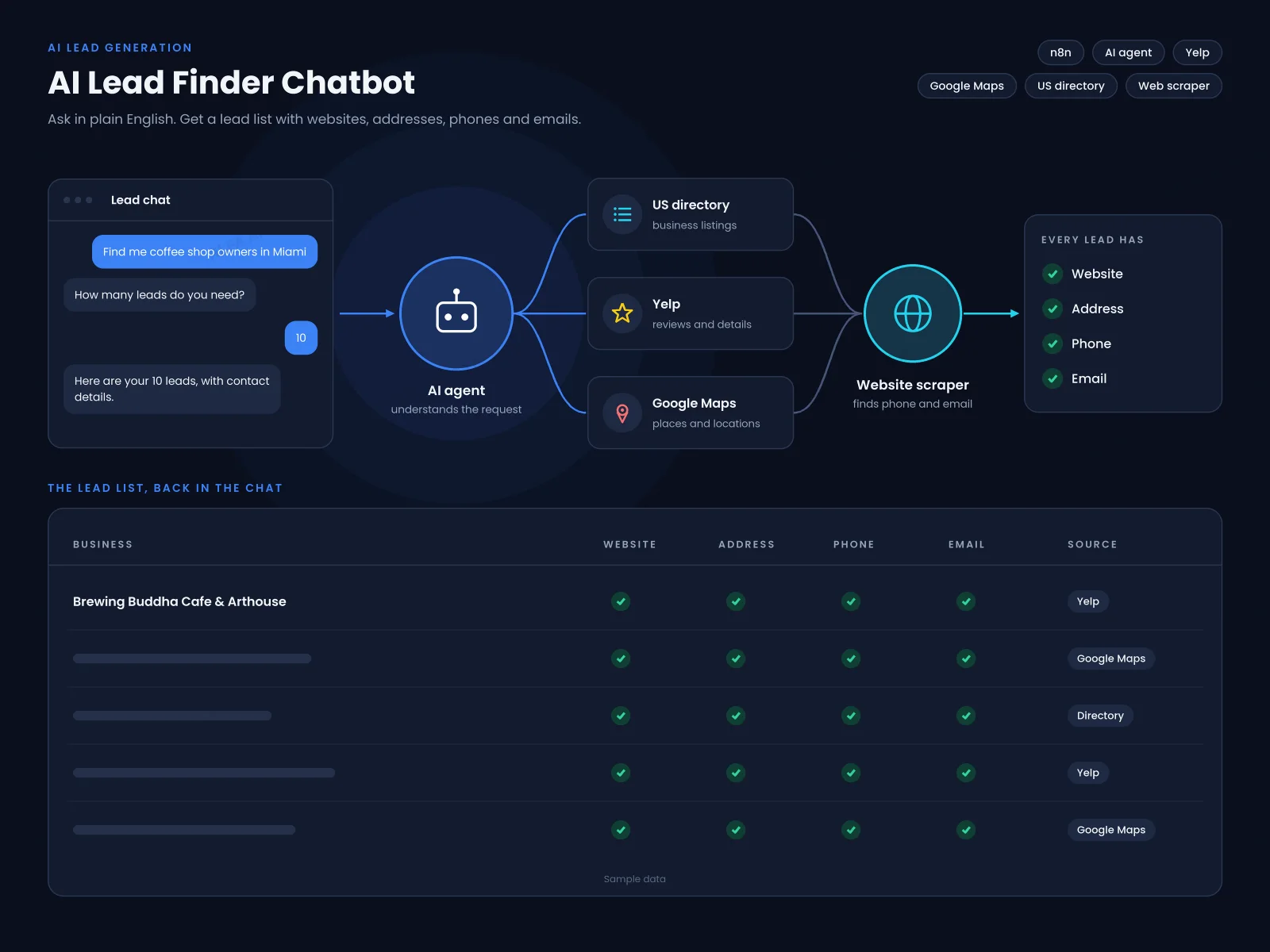 Video
AI Lead Finder Chatbot (Yelp, Google Maps & US Directories)
Building local business lead lists by hand took hours. To build a single prospect list—like coffee shop owners in Miami—someone had to search Yelp, then Google Maps, then US business directories, and manually open every business's website to hunt for an email address or phone number.
View Case Study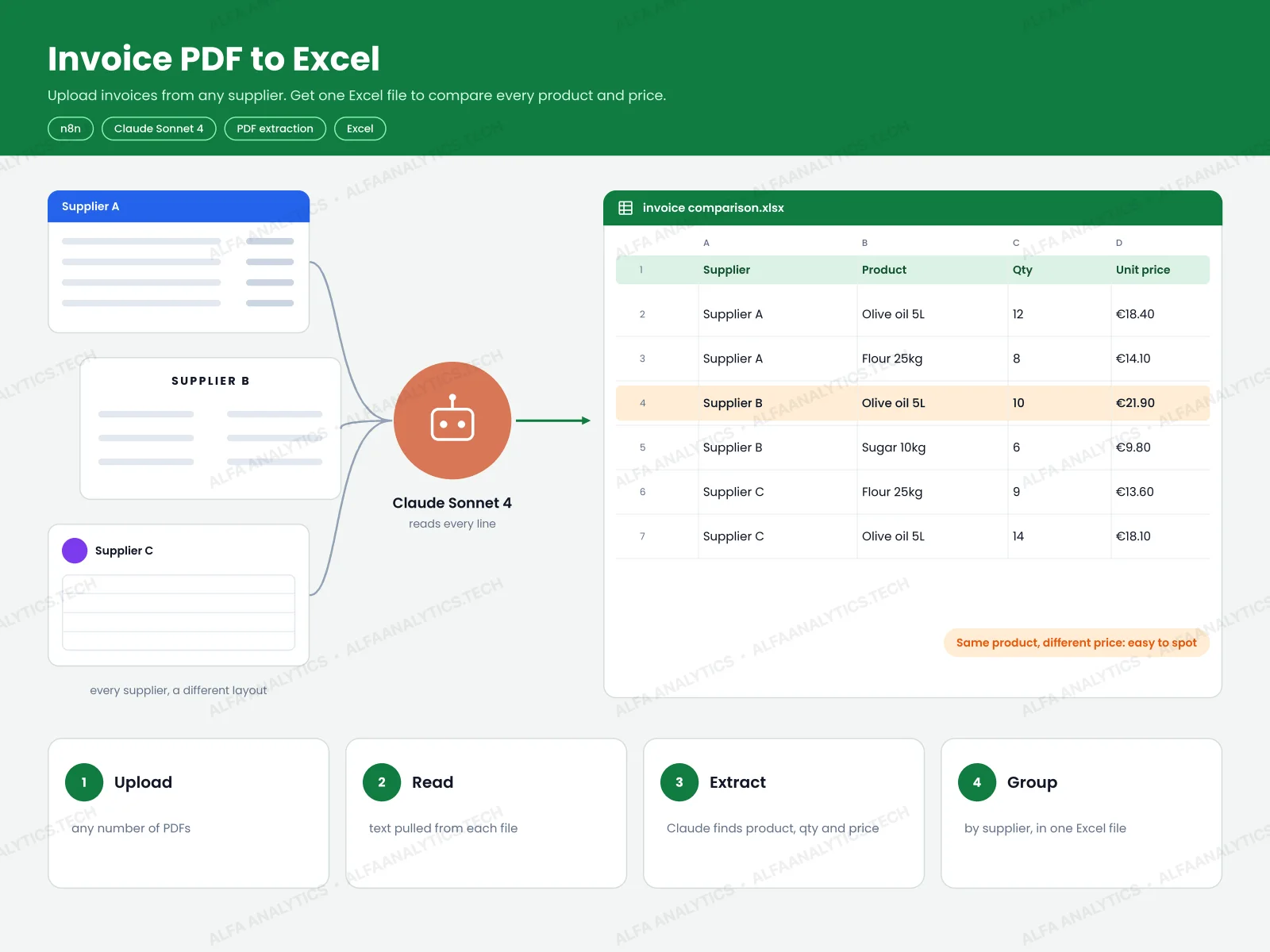 Video
AI Invoice PDF to Excel Comparison Tool
The client received invoices from many different suppliers, and every supplier used a different PDF layout. To compare product unit prices or catch billing errors, someone had to type every line item into a spreadsheet by hand—which was slow and made price changes easy to miss.
View Case Study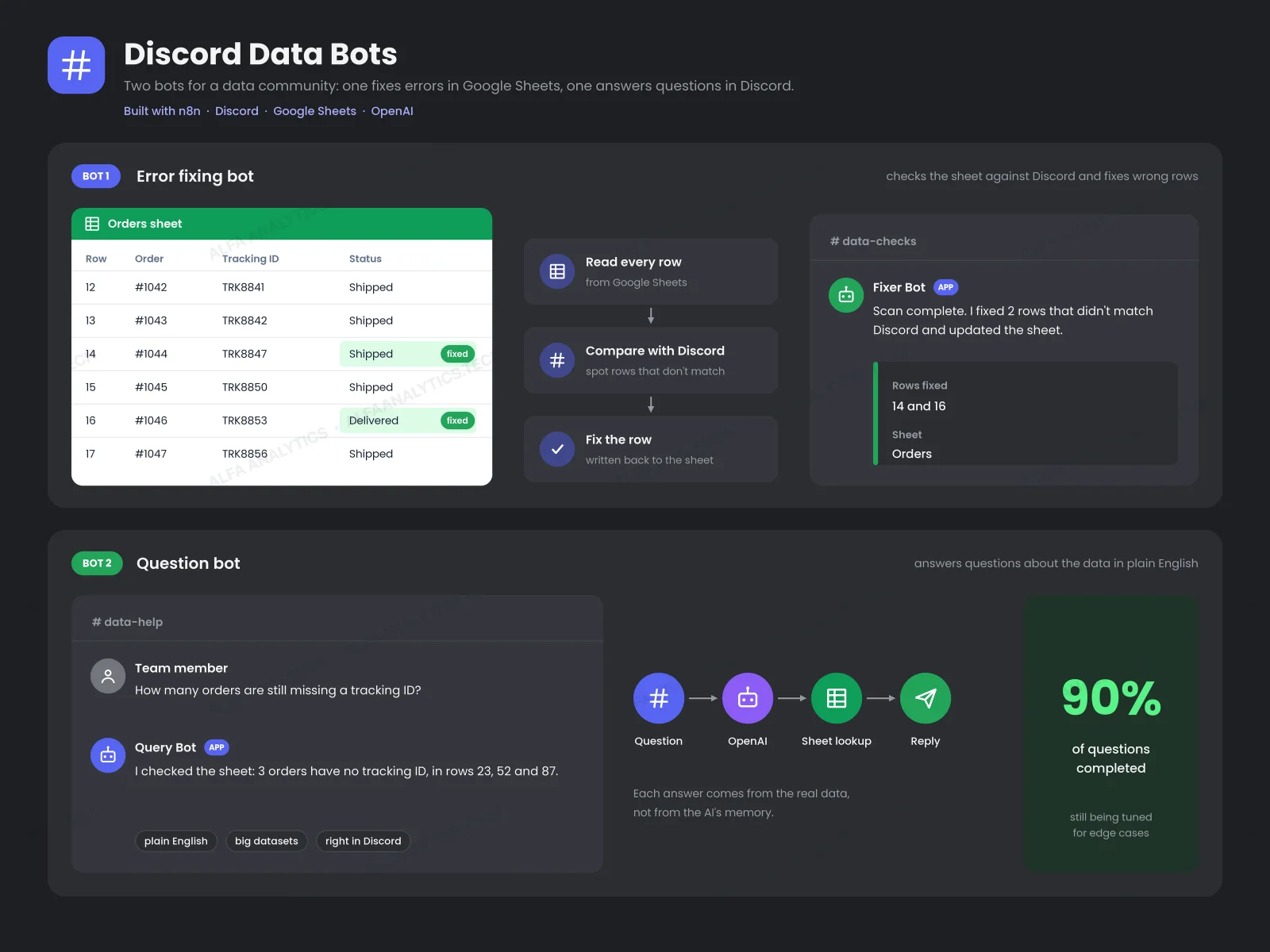 Video
Discord Data Bots: Fix Google Sheets Errors & Answer Data Questions
The team managed large operational datasets in Google Sheets while coordinating daily work in Discord. Finding mismatched rows in the sheets required tedious manual reviews, and whenever team members had a question about the data, they had to wait for a spreadsheet expert to look it up.
View Case Study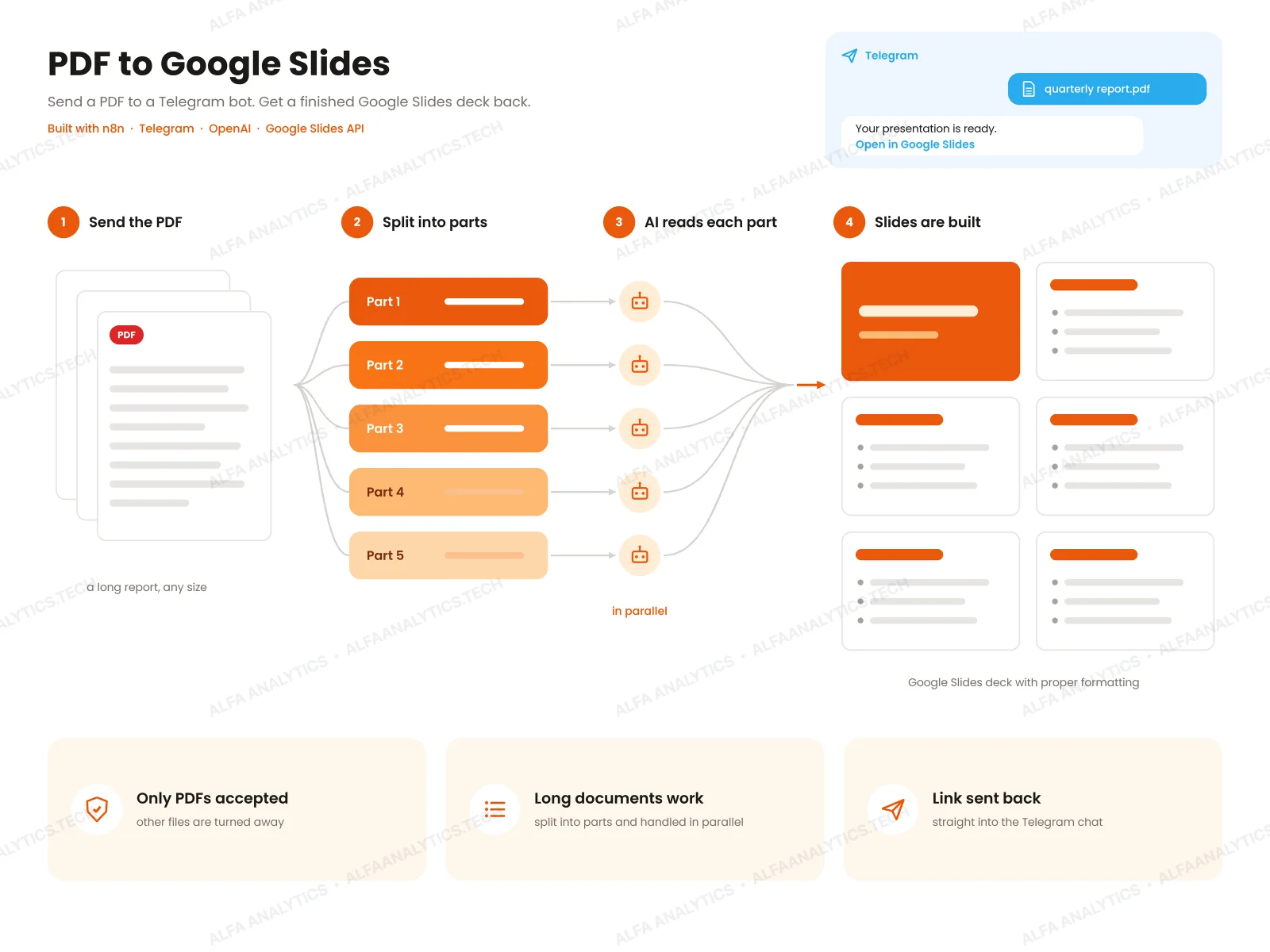 Video
AI PDF to Google Slides Converter (Telegram Bot)
The client frequently had to turn long PDF reports into presentation decks under tight deadlines. Reading the entire document, pulling out key takeaways, and formatting every slide by hand took hours—and the longer the PDF report, the longer the bottleneck.
View Case Study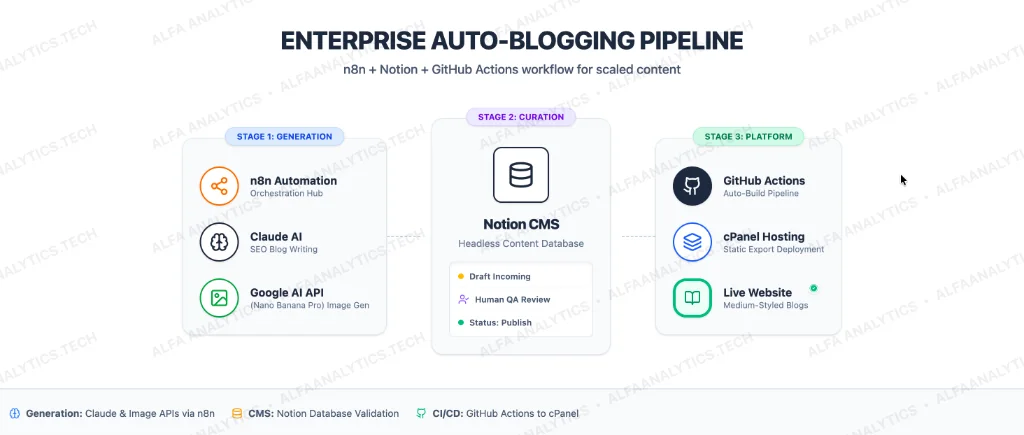
AI Auto-Blogging Pipeline with Notion & GitHub Actions
Publishing 5+ SEO blog posts a week required a full-time copywriter at $200+ per article, plus hours of manual CMS formatting and image creation.
View Case Study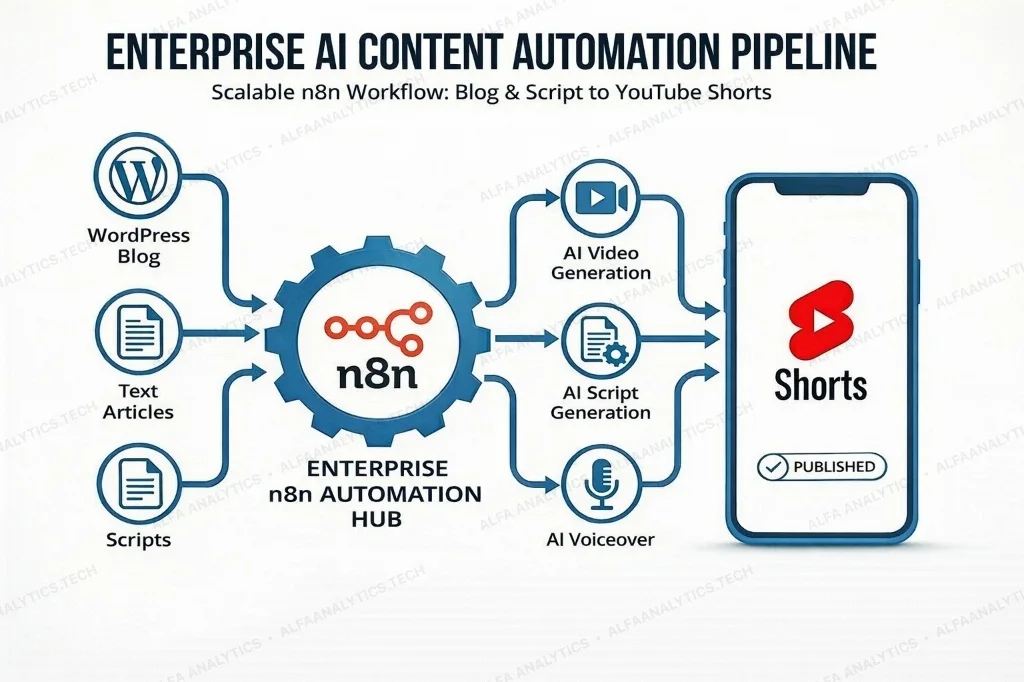
WordPress to YouTube Shorts Video Automation
The firm published 4–6 written articles weekly but had zero video presence because producing YouTube Shorts manually required a scriptwriter, videographer, and editor—costing $150/video and 3–5 days per asset.
View Case Study