Discord Data Bots: Fix Google Sheets Errors & Answer Data Questions
Key Measurable Results
Of plain-English data questions answered automatically in Discord
Mismatched Google Sheets rows corrected in place without manual review
Every answer comes directly from live sheet rows, not AI memory
1The Problem
The team managed large operational datasets in Google Sheets while coordinating daily work in Discord. Finding mismatched rows in the sheets required tedious manual reviews, and whenever team members had a question about the data, they had to wait for a spreadsheet expert to look it up.
2What We Built
Built two specialized Discord bots in n8n: Bot 1 automatically scans Google Sheets rows against data shared in Discord and fixes wrong rows in place; Bot 2 lets anyone ask plain-English questions in Discord (e.g., "How many orders are still missing a tracking ID?") and queries the live sheet to post the exact answer.
The Tools & How We Used Them
n8n Dual-Bot Workflows
Runs two independent workflows: an automated data-validation bot that audits and repairs rows, and an interactive Discord listener bot that answers user queries.
Google Sheets API
Serves as the live operational datastore—Bot 1 reads and overwrites mismatched cells in place, while Bot 2 executes filtered lookups to answer questions from real data.
Discord API
Provides both the source-of-truth messages for Bot 1's cross-checks (#data-checks) and the conversational interface where team members ask Bot 2 questions (#data-help).
OpenAI Natural Language Lookup
Translates plain-English questions into structured Google Sheets lookups and formats the real row results into a concise Discord reply without hallucinating.
How It Works — Step by Step
Built Bot 1 in n8n to iterate through Google Sheets rows, cross-check against Discord records, and overwrite wrong statuses automatically
Posted automated audit summaries to #data-checks showing exactly which rows were fixed
Built Bot 2 in n8n to listen for plain-English data questions inside #data-help on Discord
Connected OpenAI to translate user questions into live Google Sheets queries and return exact row counts and IDs
✓The Result
Of plain-English data questions answered automatically in Discord
Mismatched Google Sheets rows corrected in place without manual review
Every answer comes directly from live sheet rows, not AI memory
See this workflow in action
View Video Transcript
[00:00] [Upbeat instrumental music] The team managed large operational datasets in Google Sheets while coordinating daily work in Discord. [00:03] Discord Data Bots: Fix Google Sheets Errors & Answer Data Questions. Built two specialized Discord bots in n8n: Bot 1 automatically scans Google Sheets rows against data shared in Discord and fixes wrong rows in place; Bot 2 lets anyone ask plain-English questions in Discord (e.g., "How many orders are still missing a tracking ID?") and queries the live sheet to post the exact answer. [00:07] How it works: Built Bot 1 in n8n to iterate through Google Sheets rows, cross-check against Discord records, and overwrite wrong statuses automatically Posted automated audit summaries to #data-checks showing exactly which rows were fixed [00:12] Measured output: ~90% — Of plain-English data questions answered automatically in Discord. Auto-Fix — Mismatched Google Sheets rows corrected in place without manual review. [00:17] Live production build powered by n8n, Discord API, Google Sheets API, OpenAI API, Data Validation. [00:19] [Music fades out] Delivered in 3 weeks by Alfa Analytics.
Skills & Deliverables
Project Details
Our Role
AI Automation Developer
Client
Operations & Data Community
Industry
AI & Automation
Delivery Timeline
3 weeks
Need a similar system built for your team?
Book a free discovery call and we'll map out how to build this for your exact data sources and tools.
More AI & Automation Case Studies
View All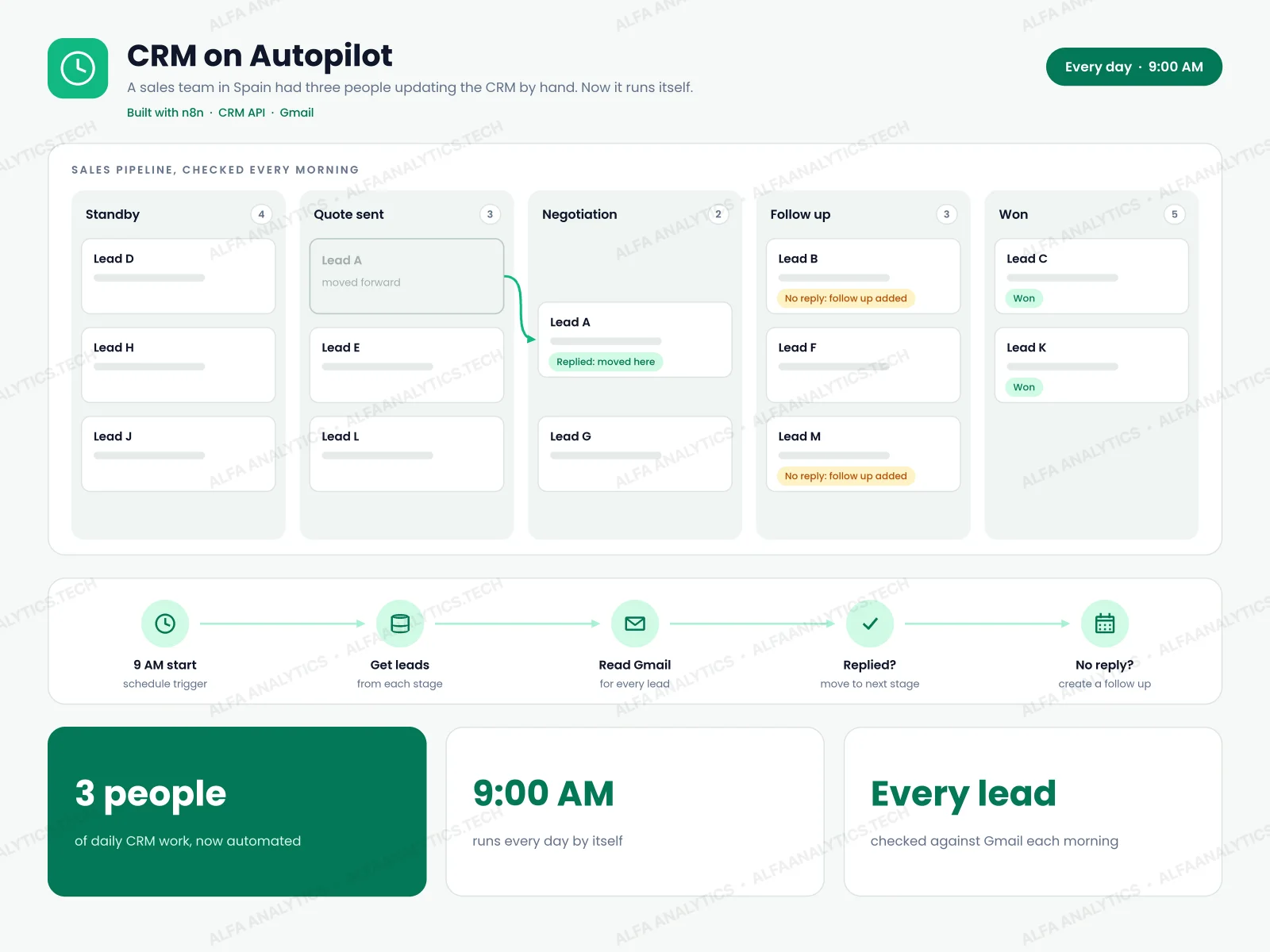 Video
CRM on Autopilot: Daily Lead Pipeline Automation
A sales team in Spain was running its entire pipeline by hand. Three people spent their days inside the CRM: checking Gmail to see who had replied, moving leads from one stage to the next, setting follow-up reminders, and fixing contact records. It was slow, error-prone, and the only way to handle more leads was to hire more people.
View Case Study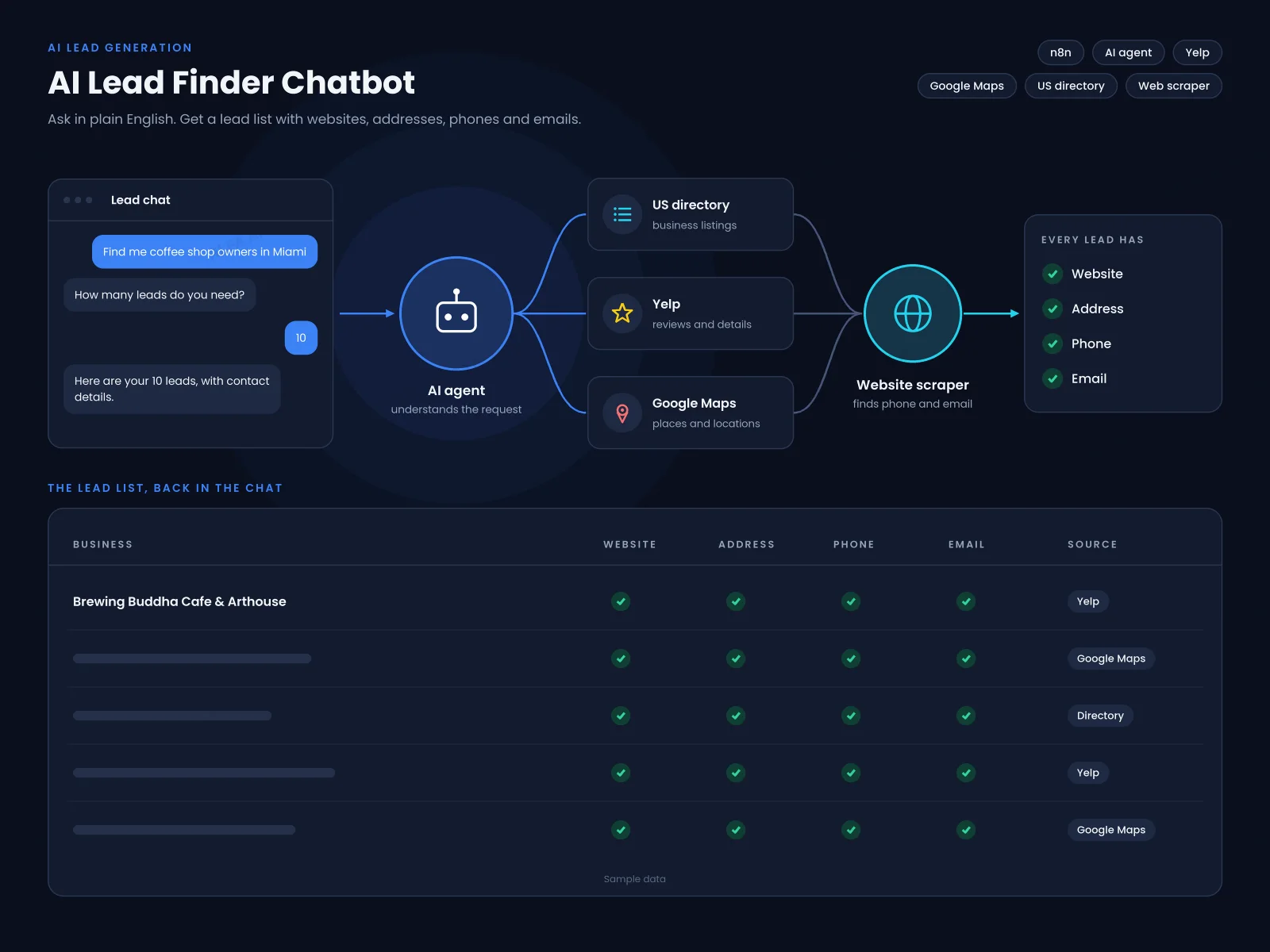 Video
AI Lead Finder Chatbot (Yelp, Google Maps & US Directories)
Building local business lead lists by hand took hours. To build a single prospect list—like coffee shop owners in Miami—someone had to search Yelp, then Google Maps, then US business directories, and manually open every business's website to hunt for an email address or phone number.
View Case Study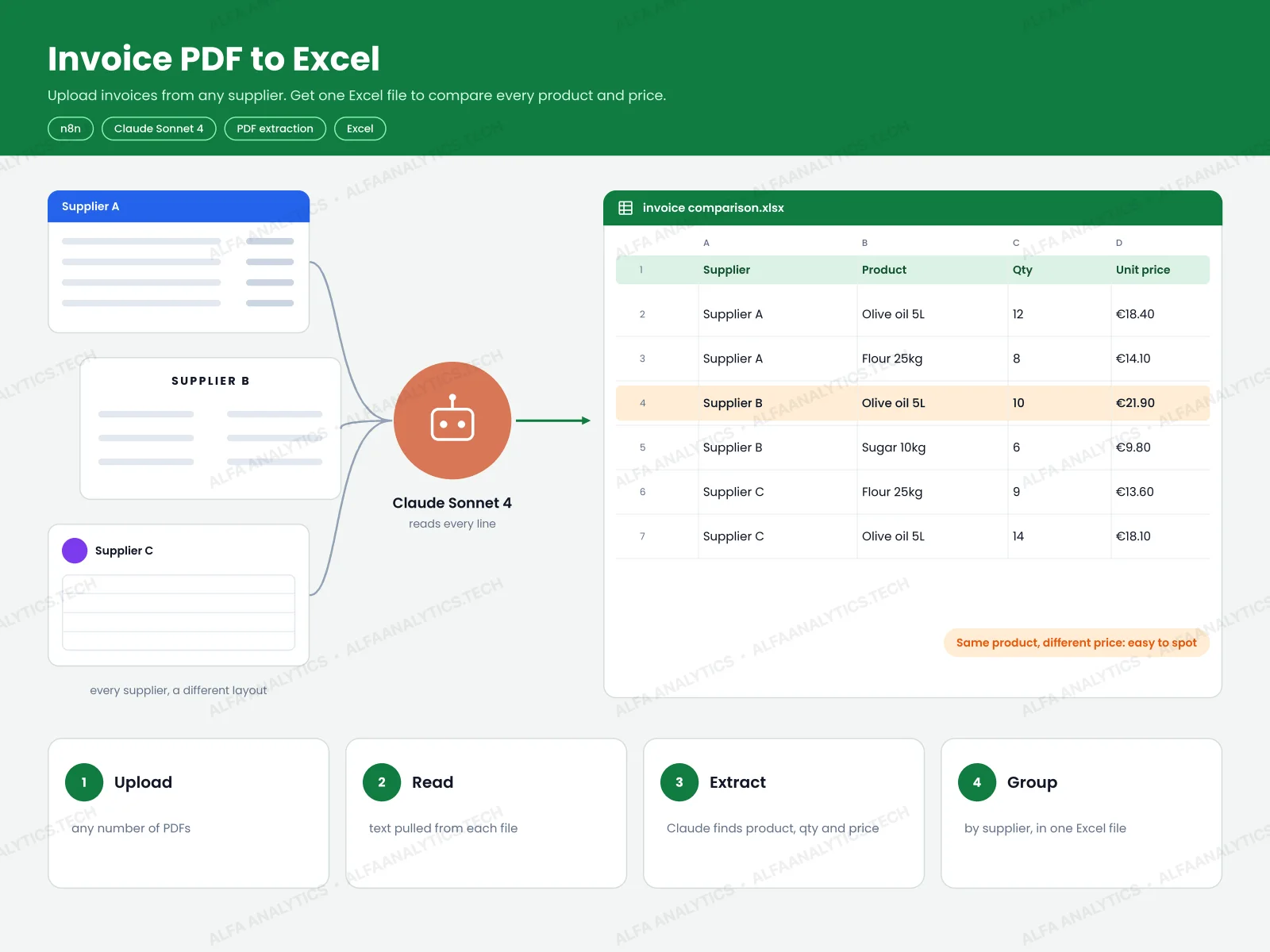 Video
AI Invoice PDF to Excel Comparison Tool
The client received invoices from many different suppliers, and every supplier used a different PDF layout. To compare product unit prices or catch billing errors, someone had to type every line item into a spreadsheet by hand—which was slow and made price changes easy to miss.
View Case Study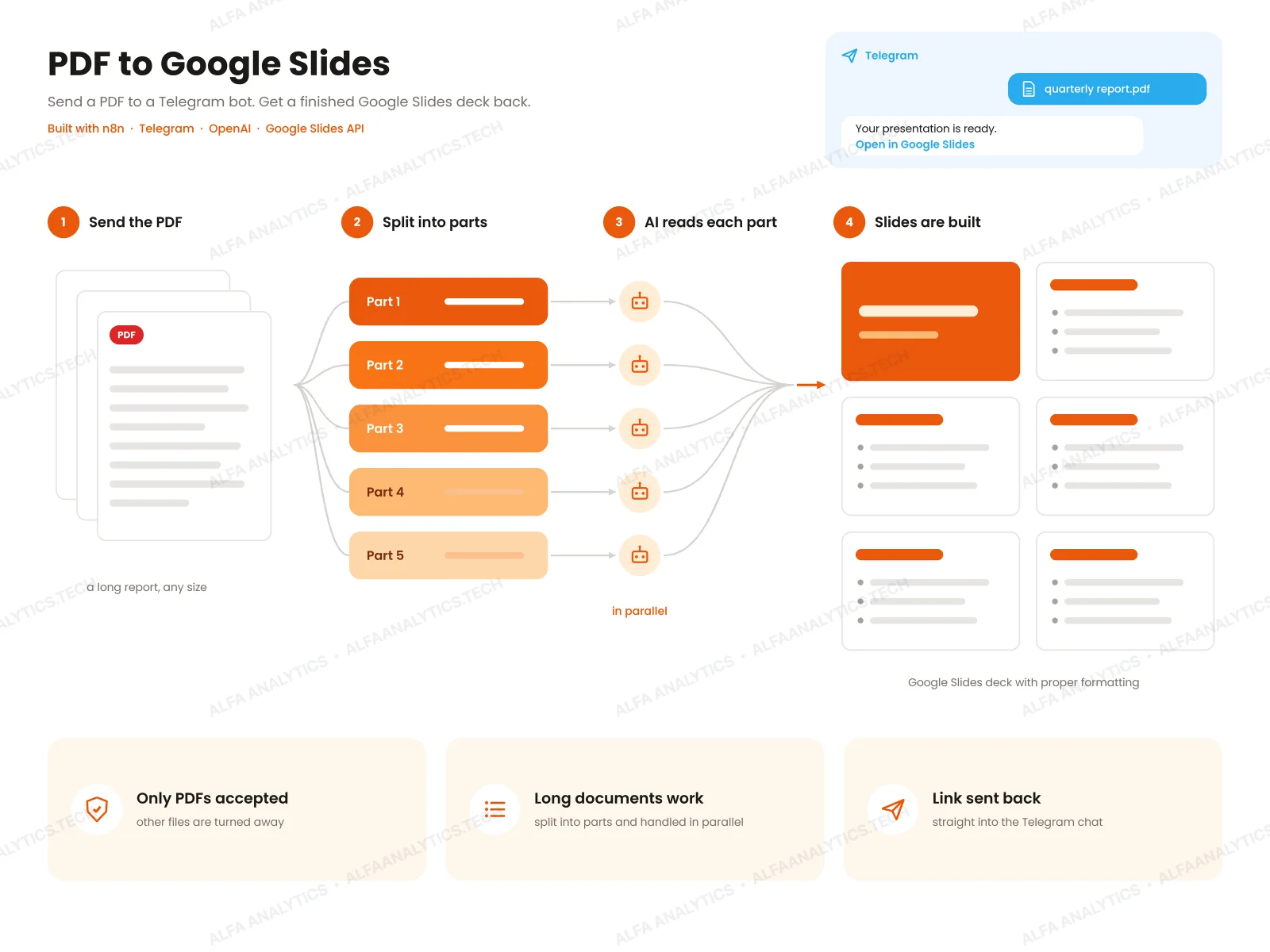 Video
AI PDF to Google Slides Converter (Telegram Bot)
The client frequently had to turn long PDF reports into presentation decks under tight deadlines. Reading the entire document, pulling out key takeaways, and formatting every slide by hand took hours—and the longer the PDF report, the longer the bottleneck.
View Case Study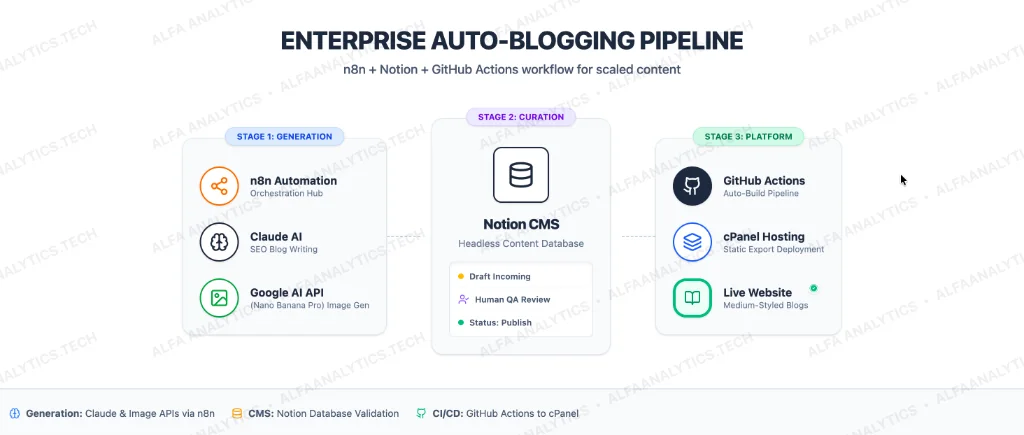
AI Auto-Blogging Pipeline with Notion & GitHub Actions
Publishing 5+ SEO blog posts a week required a full-time copywriter at $200+ per article, plus hours of manual CMS formatting and image creation.
View Case Study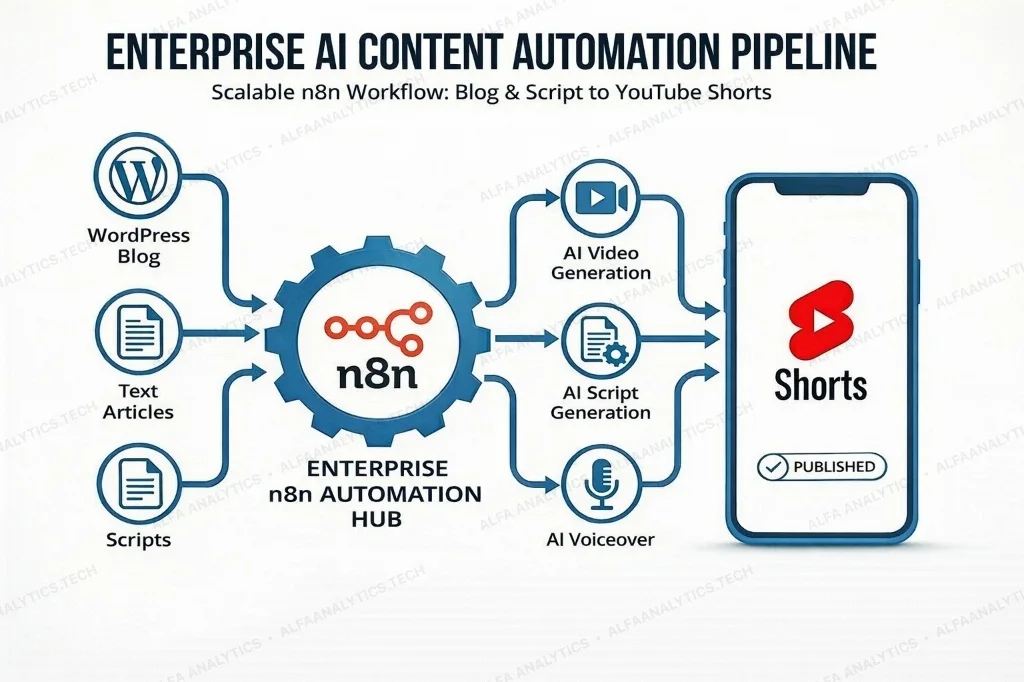
WordPress to YouTube Shorts Video Automation
The firm published 4–6 written articles weekly but had zero video presence because producing YouTube Shorts manually required a scriptwriter, videographer, and editor—costing $150/video and 3–5 days per asset.
View Case Study